I Built a Bridge: Three Days, Three Tools, and Why I Threw Away Perfectly Good Code
I’m John Brantly (Homestead). I’ve been building software for 40 years. Twelve of those at IBM doing middleware and systems integration. Another twelve running my own IT consulting shop in the Research Triangle. I’ve seen a lot of wheels get reinvented.
Last week I reinvented one myself. Then I threw it away. That decision is why you should hire me.
The Problem
I’m a physical media collector. Have been since I was trading Commodore 64 floppies in ninth grade. These days I’ve got over a thousand movies across hard drives, thumb drives, a home theater PC, Blu-rays in cases, and DVDs crammed into binders.
Tiny Media Manager (TMM) is the gold standard for organizing digital media collections. It scrapes metadata, downloads artwork, generates the files that Kodi and Jellyfin need. It’s fantastic.
But it only knows about files on your hard drive.
What about my physical collection? What about when I’m standing in a thrift store trying to remember if I already own a movie? TMM can’t help me there. Its database is locked to one machine, stored in a proprietary format that wasn’t designed to be shared.
So I built something.
Three Days, Three Tools
What started as “I just want to see my collection on my phone” turned into a suite of tools that extend TMM into territory it was never designed to cover.
Day One: Templates
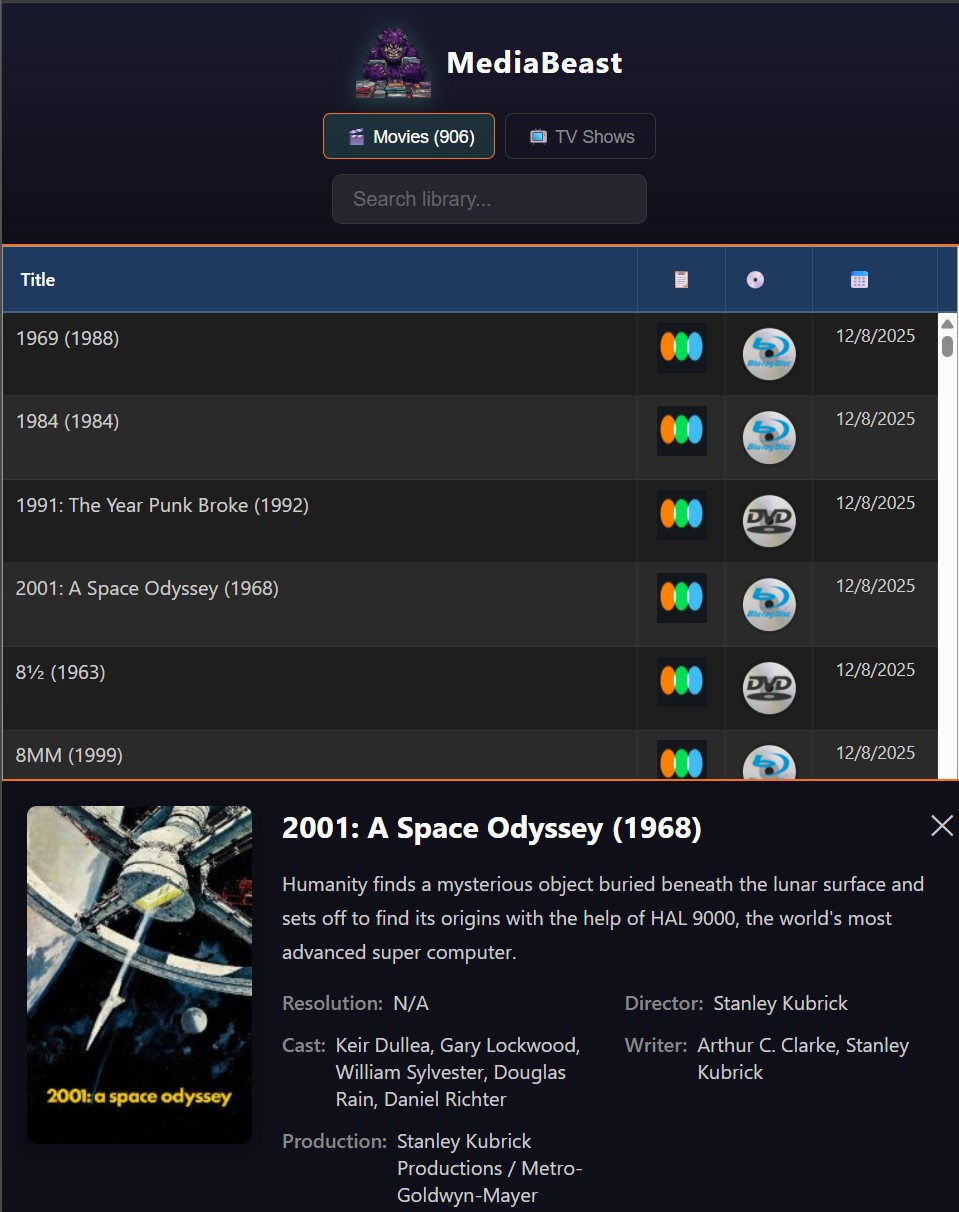
TMM has an export feature that spits out HTML. I started tinkering with the templates. Realized they’re more powerful than they look. Self-hosted one and saw my entire collection rendered in a browser.
Then the lightbulb: I can customize these. Add features. Make them actually useful instead of just a static list.
Day Two: The Overkill Pivot
Here’s where it gets interesting.
I wanted non-technical users to be able to host their own collection pages. No web server setup. No terminal commands. Just… works.
So I built a complete solution on Cloudflare Workers and Pages. Edge computing. Global CDN. The whole enterprise stack.
It took a day and a half. It worked beautifully.
I threw it away.
Why? Because I realized I was building infrastructure that would need maintenance. Debugging. Monitoring. That’s fine if you’ve got a DevOps team. But my target user is a collector who just wants to see their movies on their phone.
Netlify does static hosting with a simple API key. No edge functions to maintain. No worker scripts to debug. The user drops in their credentials, hits sync, and they’re live.
I learned a ton about Cloudflare. And then I made the right call for the actual problem I was solving.
Day Three: The Full Picture
This morning I realized I wasn’t building one tool. I was building three:
MediaBeast Publisher — Syncs your TMM exports to the cloud. Desktop app, one-click deployment, storage tracking. Currently pushing to Netlify free account with a single API key.
MediaBeast Templates — Export templates for TMM. Leverage Tabulator. Deep search your library (director, actors), Letterboxd links, Media type, tap any title for full details. Designed for mobile. Make the export pages exactly what users want.
MediaBeast Importer — Brings in everything TMM doesn’t handle. Your physical collection from blu-ray.com. Your reviews from Letterboxd. The stuff that lives outside your hard drive.
TMM handles files. MediaBeast handles everything else.
The Bridge
I’ve spent my career in the gap between what software can do and what people actually need it to do.
At IBM, that meant middleware. The unsexy plumbing that makes systems talk to each other. At my consulting shop, it meant sitting with small business owners and figuring out why their “simple” workflow actually had fifteen hidden steps nobody documented.
This project is the same pattern. TMM is powerful but technical. Collectors aren’t necessarily technical. Someone needs to be the bridge.
That’s what I do. I take complex systems and make them accessible without dumbing them down.
What’s Next
My daughter is about to become my first beta tester. She’s got the perfect setup: movies on her PC, files on thumb drives, physical Blu-rays in cases, a binder with DVDs. Plus a bunch of public domain archive.org content like Betty Boop cartoons.
I’m going to document the entire setup process. Every step. Every edge case. That’ll be a future post.
If You Need a Bridge

I’m taking on consulting clients. Custom software, workflow analysis, systems integration. The unsexy stuff that makes businesses actually run.
40 years of experience. Full-stack when you need it, light-touch when you don’t. I build what you need and nothing more.
Contact me or check out my other work on my github.