MediaBeast Publisher: The Push to GitHub
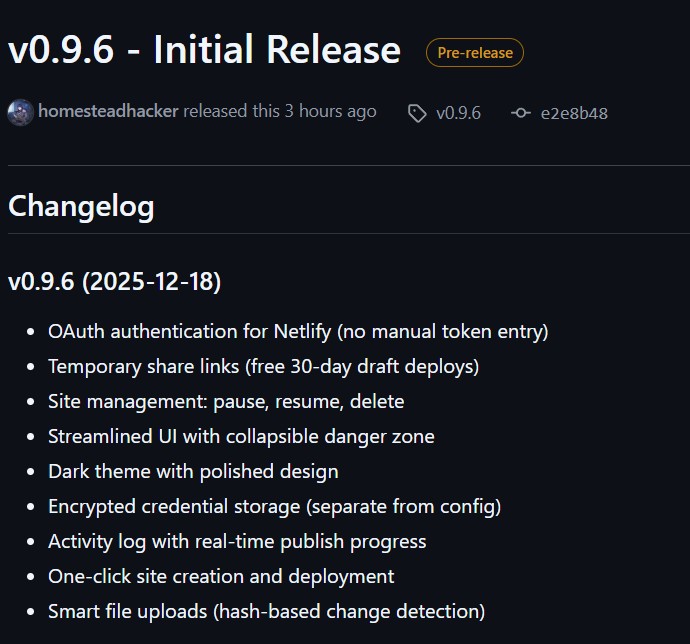
MediaBeast Publisher hit GitHub today. It’s a desktop app that publishes your Tiny Media Manager movie collection to Netlify. OAuth authentication, smart file uploads, temporary share links, the works.
Passing tests means the code works. Shipping means someone besides you can actually use the thing. This is just a quick post to document the last couple of day’s push from “tests passing” to “ready to ship.”
The Work
Started with further improvements to provider architecture. The app needs to support multiple hosting providers eventually, so I built a registry pattern for dynamic UI loading. Netlify cards load when Netlify is selected, GitHub Pages cards (stubbed for now) swap in when that’s selected. Clean separation means adding providers later won’t touch the main window code.
Replaced manual token entry with OAuth implicit grant flow. Local callback server, state parameter validation, fallback URL if the browser fails to open. Added temp link management, up to three named draft deploys with 30-day expiry, synced with Netlify’s API.
Walked through the app as a new user would. Pulled out The “Netlify Credits Spent” feature that duplicated what Netlify’s dashboard already shows. Simplified confirmation dialogs. Reordered the UI to put primary actions where they belong. Normal iteration: build, test, tighten.
Added a three-step setup wizard for new users. Compacted the UI by moving help text into tooltips and reclaiming vertical space for the activity log. Threw in QR codes for opening your published site on mobile. Updated documentation to match reality.
The Polish
The app worked before this. These two days were about making it work for someone who isn’t me.
- Windows installer with proper Start Menu integration
- First-run wizard (Welcome → Connect → Create Site)
- OAuth authentication to Netlify
- Site pause/resume and management
- More Compact UI, QR codes
The Process
I like to cook. Spent my earlier years in the kitchen with my mom, learning from her. She taught me a lot, but the one best thing was “clean as you go.” The dishes, the messes, the cutting board between ingredients. Don’t let entropy accumulate.
Same principle applies to software. I run every project, even my own, through the same lifecycle: intake, discovery, problem brief, scope, specification, implementation, documentation, handoff. The front end defines what “done” means before a line of code gets written. The back end delivers a working product with documentation that someone else could maintain.
In between, I system test continuously. Not unit tests in isolation. Actual use, in context, as I build. Especially running a one-man shop, you can’t afford to let things pile up and discover problems at the end. Build a feature, test it like a user, tighten it, move on. Clean as you go.
Git It
Code’s on GitHub: homesteadhacker/mediabeast-publisher
I also published https://github.com/homesteadhacker/mediabeast-publisher/releases/tag/v0.9.6 with a Windows installer: download the .exe, run it, done. No Python environment, no dependencies, no dev setup required. If you’ve got a TinyMediaManager collection and want to share it, you can be live in five minutes.
MediaBeast Publisher syncs Tiny Media Manager exports to Netlify hosting. Free tier friendly.