Turning a Gaming Rig Into a Local AI Powerhouse
My main computer is a 3-year old “gaming rig”. It was top of the line when I bought it, featuring an NVIDIA RTX 3090 with 24GB of VRAM, which is still a pretty decent video card (GPU). GPUs excel at linear algebra (matrix math / vector operations) which both 3D video rendering, and AI need. I’ve been using it for running local AI models that do real work for my consulting business and personal projects. No subscriptions, no cloud APIs, no sending my data anywhere.
This isn’t theoretical. In the past week, I’ve built out a comprehensive local AI toolkit that handles transcription, image generation, video generation, vision/OCR, text-to-speech, voice cloning, music generation, and general-purpose chat all running on hardware I already owned.
Here’s what I set up, why each piece matters, and where local models are still useful, even though they typically lag in capability about 1 year behind the best cloud/SaaS models.
The Hardware Reality
The RTX 3090 hits a sweet spot for local AI. That 24GB of VRAM is enough to run serious models (32B parameter LLMs at full precision, 70B models at aggressive quantization, or SDXL image generation with all the bells and whistles). You can’t run everything simultaneously (VRAM is a zero-sum game), but with a mode-switching approach, one GPU becomes an entire AI department.
The AI stack lives under a single organized directory. It’s indexed and I can easily add more tools as I go:
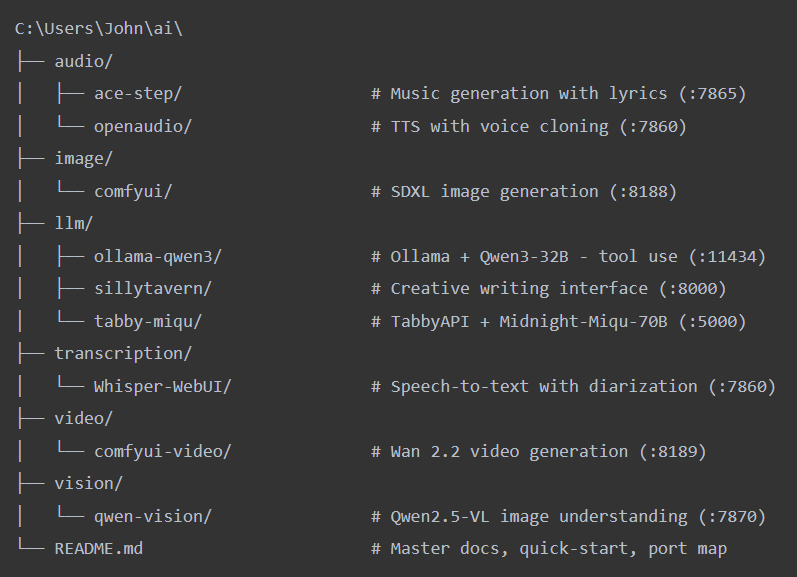
Every tool follows the same pattern: a run.ps1 to start it, a stop.ps1 to kill it, and a setup script if there’s first-time installation. The README at the root is the single source of truth with a quick-start table, VRAM budget, port map, troubleshooting. Docker handles Open WebUI (the ChatGPT-like interface on port 3000) and SearXNG (private search aggregation). Everything else runs natively with its own Python venv.
The Toolkit: What’s Running and Why
1. LLM Chat : Two Modes, One GPU
This is the backbone. I run two different large language models depending on what I need, switching between them with PowerShell scripts:
Creative Mode uses Midnight-Miqu-70B, a 70B parameter model running through TabbyAPI with EXL2 quantization at 2.5 bits per weight. It consumes nearly all 24GB of VRAM and delivers around 16-18 tokens per second. This is the creative powerhouse for assisting with storytelling, brainstorming, long-form writing, character development.
Tools Mode uses Qwen3-32B (abliterated) through Ollama, with native function calling support. This one can actively decide when to search the web, process results, and do multi-step research. It’s the practical workhorse for coding questions, factual research, and tasks that benefit from tool use.
Switching takes about 30 seconds: the run scripts handle cleanup automatically — stop the current model, free the VRAM, load the next one. Not elegant, but it works. The VRAM budget table in my README tells me at a glance what can coexist and what needs the full GPU.
2. Image Generation: ComfyUI + SDXL
ComfyUI with the RealVisXL checkpoint gives me photoreal image generation locally. Use cases include:
- Text-to-image: Type a prompt, get photorealistic output
- Background removal: RMBG-2.0 integrated as a ComfyUI node. Load image, click run, get a true transparent PNG with properly handled hair and wispy edges. This alone saves me from constant trips to remove.bg
- 2D pixel art generation: This one’s been crucial for game asset work. Generating sprite sheets, tilesets, and game-ready pixel art at exact dimensions, then touching them up in Aseprite if needed. For anyone doing indie game development or modding, having a local pipeline that outputs game-ready 2D assets on demand changes the workflow completely
Automated background removal (for transparent background images) is the one I use most. Product photos, blog graphics, assets for web projects, etc. At the volume I process, a cloud subscription adds up. Locally, it’s instant and free since I’m just leveraging the computer I already own.
3. Voice Transcription , Diarization, & Translation: Whisper
This is a very strong ROI case for local AI. For many applications, running Whisper locally on a dedicated workstation can dramatically cut transcription costs while keeping sensitive audio and text entirely inside a firm’s network, eliminating third-party data exposure. But in regulated fields like healthcare and law, clients may prefer cloud vendors for compliance and risk transfer. There is a big trade-off with regard to liability for the likes of BAA/HIPAA .
Whisper-WebUI running faster-whisper with the large-v3-turbo model on the 3090 transcribes audio at roughly 5-10x real-time speed. A ten minute recording processes in under two minutes. With speaker diarization via pyannote, I get timestamped, speaker-labeled text.
Use cases that actually matter: client meeting recordings become searchable text. Phone calls get automatic notes. Hours of audio from research interviews get indexed. The cloud alternatives (Otter.ai, Rev, etc.) charge monthly fees and send your audio to their servers. Locally, my audio never leaves the machine.
As a physical media collector, this also unlocked something I’d wanted for years: subtitles for foreign films that were never released with them. Rip the DVD, run the audio through Whisper, and it generates SRT files — proper subtitle tracks with timestamps. Movies I couldn’t fully enjoy now have subtitles that simply didn’t exist before. Whisper handles 99 languages, so this works across my entire collection regardless of origin.
For my consulting practice, this is also a demonstrable capability. I can show a client: “For the cost of a few months of cloud transcription, you own the hardware forever.”
4. Vision & OCR: Qwen2.5-VL
Qwen2.5-VL-7B running through its own Gradio interface gives me a vision model that understands images and extracts text with 95.7% accuracy on document benchmarks. I can photograph a shelf of books, ask for every title and author as JSON, and get structured output.
This setup can handle receipts, invoices, business cards, and any document that needs digitizing. I also used it for prototyping for MediaBeast. My killer app idea for movie cataloging: instead of manually adding, or even scanning individual UPCs, take a photograph of a whole shelf of movies (or books!), and let the model do the data entry based on the “spine” text. It’s not quite “there” yet, but it’s promising.
5. Audio Generation: TTS, Voice Cloning, and Music
OpenAudio/E2-F5-TTS gives me natural-sounding text-to-speech with voice cloning from roughly 10 seconds of sample audio. ACE-Step handles music generation with lyrics through a Gradio interface.
The voice cloning capability deserves a direct conversation about responsibility. Now it is trivial to do what cost over $1M per voice when I was working at IBM on Viavoice! You can feed it a short clip of any voice, and it generates speech in that voice that’s increasingly hard to distinguish from the real thing. The legitimate uses are compelling: giving a consistent, natural voice to TTS output for content creation, generating voiceovers without hiring talent for every iteration, accessibility applications. I wanted to understand what this technology can do so I can speak to it knowledgeably with clients.
But let’s also be blunt about what’s on the other side of this coin. The same capability that lets a podcaster clone their own voice for automated show notes also lets a scammer clone your grandmother’s voice from a Facebook video and call you asking for money. Voice phishing, identity fraud, deepfake audio evidence… this is what criminals are already doing with these tools. Understanding the threat landscape is part of why I set this up. You can’t advise clients on AI risk if you don’t know what the tools actually do.
6. Video Generation: Wan 2.2
A second ComfyUI instance runs Wan 2.2 for image-to-video generation. Feed it a still image and a prompt, and it generates short video clips. This one needs the full GPU, nothing else can run alongside it. Still experimental for production use, but the quality is improving rapidly and it’s useful for prototyping animated content from static assets.
7. What I Didn’t Set Up (Yet): Local Coding Agent
I researched this extensively: Qwen-coder, Aider, Open Interpreter, Continue.dev, Goose, and decided to hold off. Claude Code is so far ahead of anything a local model can do for agentic coding that it wasn’t worth the setup. Local models still trail cloud models significantly on coding benchmarks, and for my spec-driven workflow where I’m writing architecture and having AI implement, quality matters more than cost savings.
That said, there are practical applications on the horizon. High-volume, lower-complexity code generation. Boilerplate, test scaffolding, simple CRUD are examples that are viable locally. And the models are improving fast. This is a “check back in six months” situation, not a “never going to work” situation.
Where Local Actually Wins Over Cloud
I spent a lot of time thinking about this, and the honest answer is narrower than the hype suggests. Here’s where local genuinely makes business sense:
High-volume, repetitive processing. Background removal, transcription, OCR — anything where you’re running the same model against hundreds or thousands of inputs. Cloud APIs charge per-call. The GPU pays for itself at volume.
Speed-sensitive workflows. Local inference has zero network latency. For interactive work — generating images, testing prompts, iterating on transcription settings — the feedback loop is noticeably faster than round-tripping to an API.
Privacy by architecture, not policy. When I transcribe a client’s confidential meeting recording, that audio physically cannot leave my machine. No BAA needed, no trust in a cloud provider’s data handling policy. The data never touches a network interface. But the client and I have to work through, and mitigate, privacy/liability concerns carefully.
Understanding the full capability spectrum. Cloud models are increasingly opinionated about what they will and won’t do. For legitimate creative work, research, and especially for understanding what bad actors can do with AI tools, running local models gives you unfiltered access to the technology as it actually exists. If I’m advising a client on AI risk, I need to know what these tools can do — not what a cloud provider has decided they should do.
Local models generally lag about one year behind the best cloud offerings. But think about where cloud AI was a year ago. There is a lot of power at the edges, and that’s exactly where local models live today. The gap is real for frontier reasoning and complex multi-step tasks, and I still use cloud APIs for the hard stuff. But a year-old level of capability, running unlimited on hardware you already own, with zero per-token costs? That’s not a consolation prize. That can be a very low-cost workforce.
The Pattern: Infrastructure, Not Apps
What I’ve actually built is infrastructure. Every capability follows the same pattern: a model served through an inference engine, accessed through a web UI, with standardized run.ps1 and stop.ps1 scripts managing lifecycle and VRAM allocation. It’s a toolkit of interchangeable parts:
Model (weights on disk)
  → Inference Engine (TabbyAPI / Ollama / ComfyUI / Gradio)
    → Web Interface (Open WebUI / ComfyUI / Gradio)
      → run.ps1 / stop.ps1 for each tool
        → README.md as single source of truth
This matters because it’s composable. When a new model drops that’s better at OCR, I swap it into the same infrastructure. When I need to demo a capability for a consulting client, I’m showing them the actual production setup, not a toy.
What’s Next
The toolkit will keep expanding. Document RAG (“chat” with your documents and files locally via AnythingLLM or similar) is the next obvious addition, especially for my consulting work where clients have documentation libraries they don’t want leaving their network. Local coding agents will get there eventually. And the models themselves keep improving.
Got a computer with a GPU collecting dust between gaming sessions? Got workflows bleeding money to cloud subscriptions? I help small and mid-size businesses figure out where local AI actually pays off — and then I build it. Get in touch at johnbrantly.com