The Brantly TV Computer
The problem with my parents’ entertainment devices like a Fire TV, or a “smart” TV is that they are “walled gardens”… we get stuck with their UX choices, locked down settings, and it’s impossible to fix remotely when it breaks. So I built them their own: The Brantly TV computer, a heavily customized Linux HTPC appliance I made myself. Leveraging Kodi with a dead-simple interface with an easy way to go back to the “main menu” from anywhere, running on a computer I can remote control and repair, modify, and add content to, from anywhere.
Two bad options
My folks loathe the term “streaming” because it’s a confusing mess, they prefer the Cable TV grid and DVR that they are used to.
Option A: buy them a commercial box. A Fire TV, a Roku, a “smart” TV. They can use it… sort of. The home screen is a often a confusing mess. It nags for updates, buries the one thing they want under six things a company paid to place there, and reshuffles the layout when they just got comfortable with the old one. You can’t add the feature you know they’d love, because the vendor didn’t ship it. They call for help, and you’re on the phone, powerless, because it isn’t your box. You’re a tenant in someone else’s walled garden, and so are they.
Option B: give them a real computer. Now you have total control. But they don’t stand a chance — a general-purpose desktop in front of my parents is a support call with a power cord.
I didn’t want either. I wanted the control of Option B for me, with the simplicity of Option A for them. So I built the thing that doesn’t exist on a shelf: eight big menu items, always in the same place. It turns on and works. My side is a real Linux computer I own end to end, where I pick every feature, every channel, every button — and when something’s wrong or I want to change it, I reach in over the internet from my own house and do it in minutes. No vendor, no walls, no permission, no drive across the state.
That’s the whole project, and the whole craft: keeping both of those sentences true at the same time. My parents get their “Brantly TV Computer” on HDMI input labeled “Brantly”. I get a computer with full control. Neither of us gets a landlord.
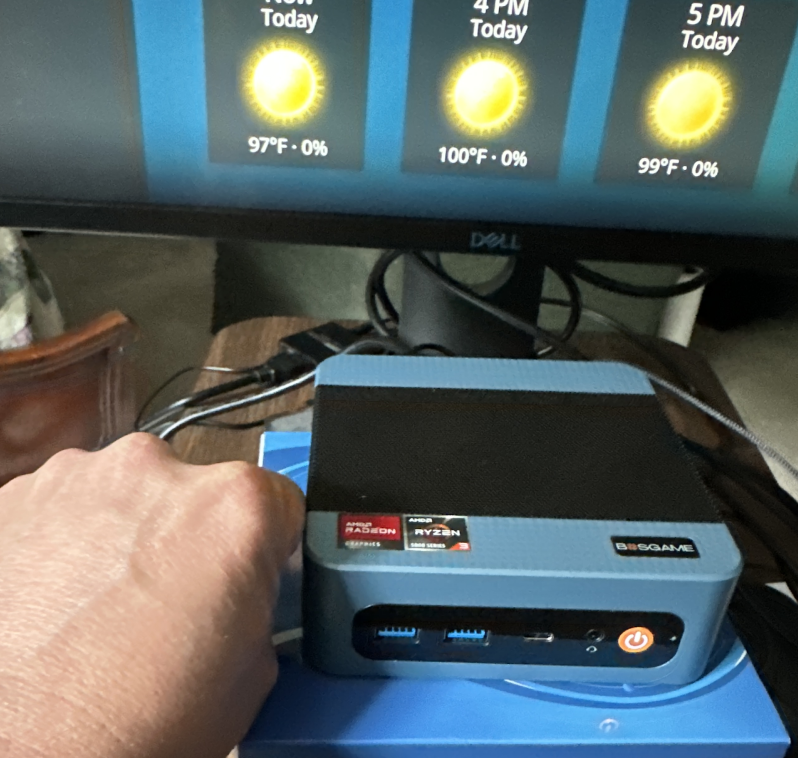
Underneath it’s a $300 mini-PC running Linux, a home-grown live-TV system with many thoughtful UX decisions, and a recovery design adapted from a concept I created back in the 90s. But the user on the couch will never know that — which is exactly the point.
Part 1: What my parents see
They turn on the TV, and it’s a TV
On their TV, I used an HDMI input they were familiar with but never used: HDMI3 “Blu-ray”. I changed this label to “Brantly” and this clicked for them. This was the hardest problem to solve, since it was part of the walled garden I couldn’t control. It wasn’t different or scary though, they DO know how to change HDMI inputs on the TV.
When it turns on, It powers on straight into one simple menu… always in the same order, forever:
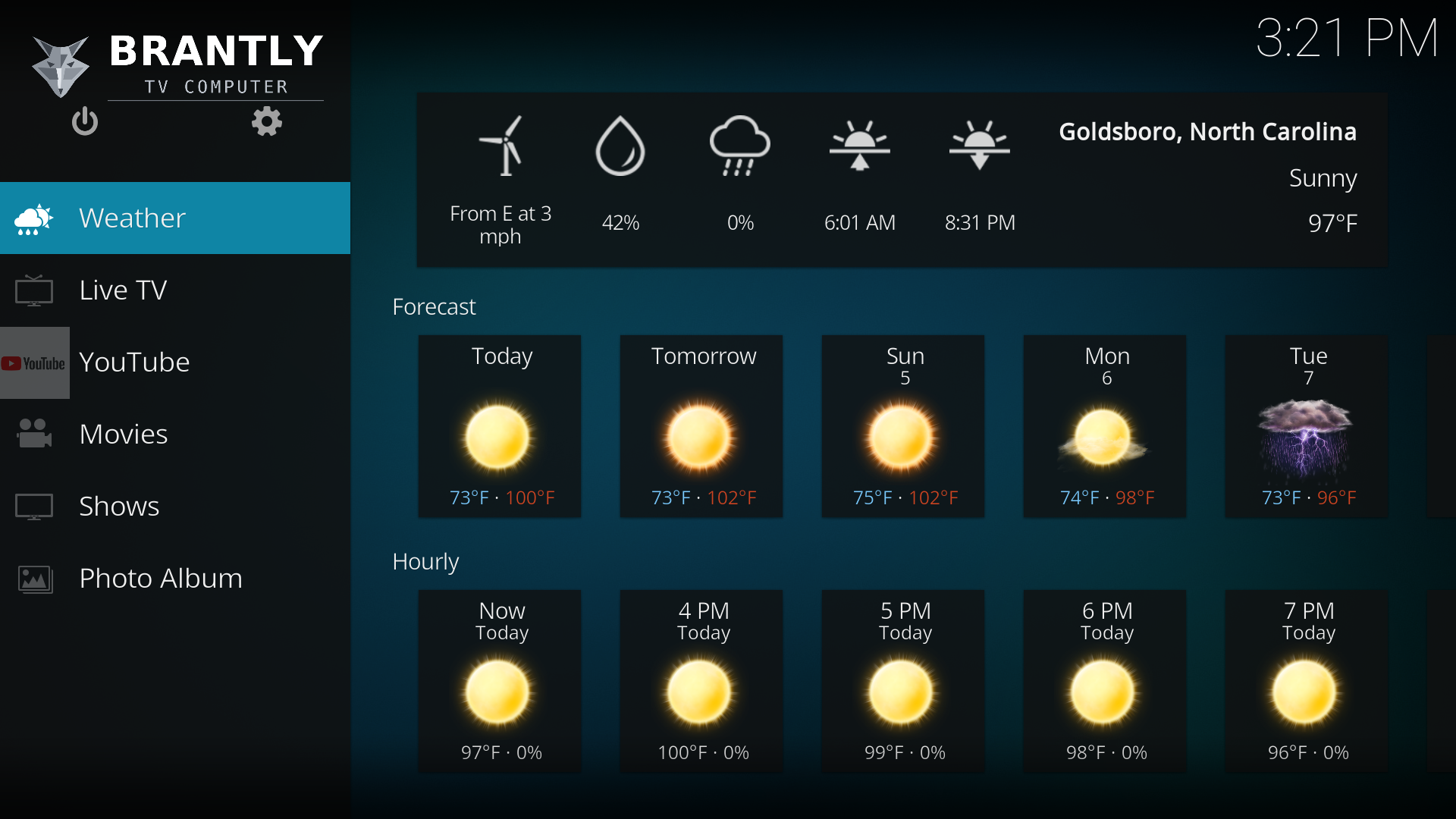
(Youtube Favorites and Home Movies were added in a later version after this screenshot)
Weather is first because it’s what Dad checks every morning, and it’s not overwhelming like a SmartTV start screen. The order never shuffles, nothing gets “recommended” into the top slot, and there’s no ninth item hiding around a corner. When a thing is always in the same place, users can stop needing to read the screen, it becomes muscle memory.
The remote is built for their hands, not a reviewer’s
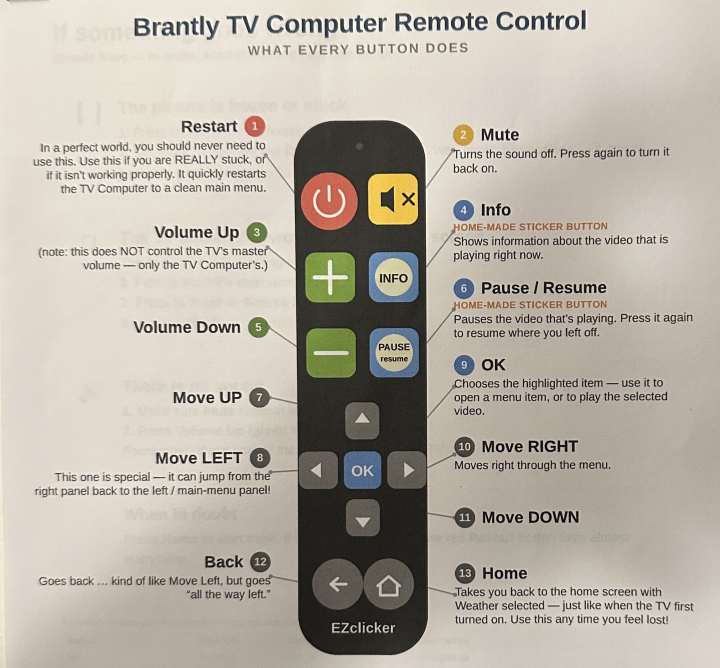
It’s a big-button universal remote — chunky keys, no sea of tiny identical buttons. I relabeled two of them with physical stickers so they say what they actually do: Info and Pause.
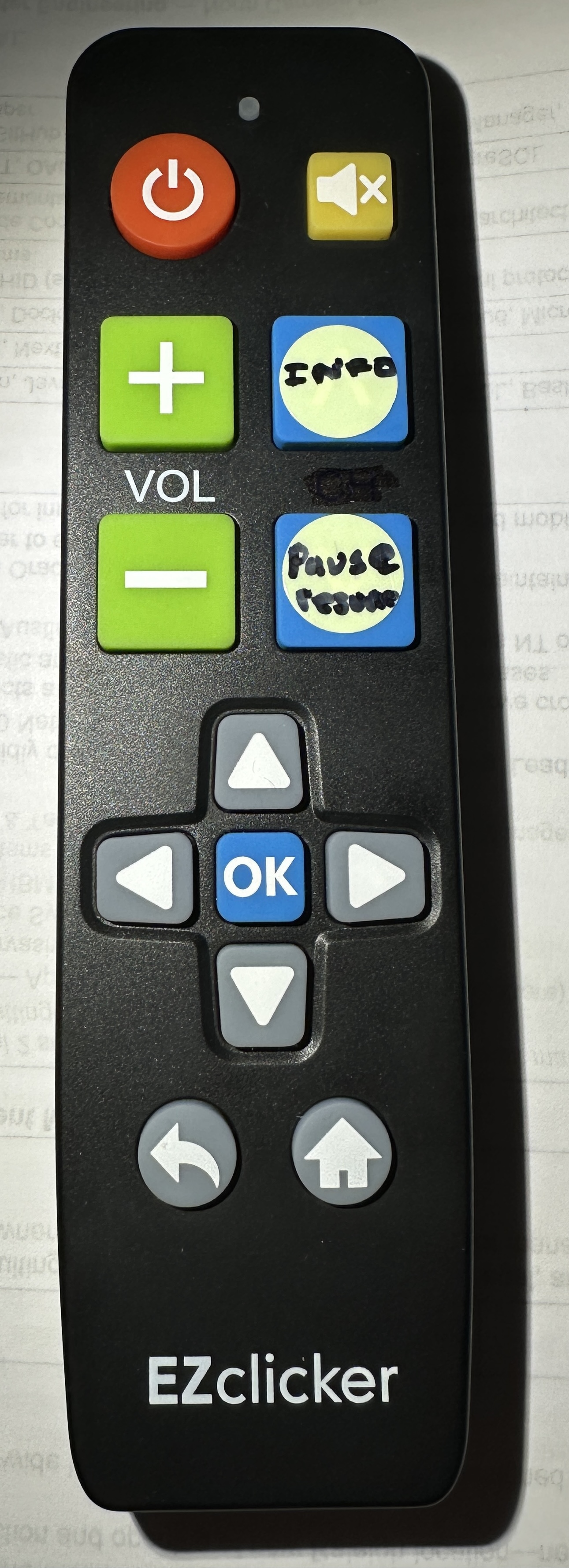
- The red button restarts everything and drops them back at that clean main menu. If they’re ever truly stuck, that’s the entire troubleshooting manual: press the red button, wait a moment. (It restarts the TV software — it can’t accidentally power the machine off, no matter how it’s mashed.)
I even made them a one-page printed guide with arrows pointing at each button, in big type, for the coffee table. The remote and the paper are the whole interface.
One button, one behavior
Here’s a small thing that turned out to be huge. On a normal media box, OK and the right-arrow often do subtly different things on the same item (one opens it, one previews it). To me that’s a nuance. To my parents it’s two mystery outcomes from two buttons they consider identical, and it made them hesitate every single time.
So I made every item on the home screen do the exact same thing whether you press OK or right. There’s no wrong button anymore.
There’s always a way back
The single most important thing they needed wasn’t a feature — it was an escape hatch they could trust:
- The Home button is a guaranteed “start over.” From anywhere — deep in a menu, mid-video, lost in an app — one press stops whatever’s playing and puts them right back at the main menu with Weather selected, exactly like they just turned it on. They don’t have to know where they are to get home.
- Back always stops the video and returns to the menu. No leaving something playing invisibly in the background, no “are you sure?” It does the obvious thing.
- There are no dead ends. They physically cannot wander out of an app into a file browser, or fall out of the TV software onto a Linux desktop. The exits that would confuse them simply aren’t there — I removed them.
Live TV that feels like cable
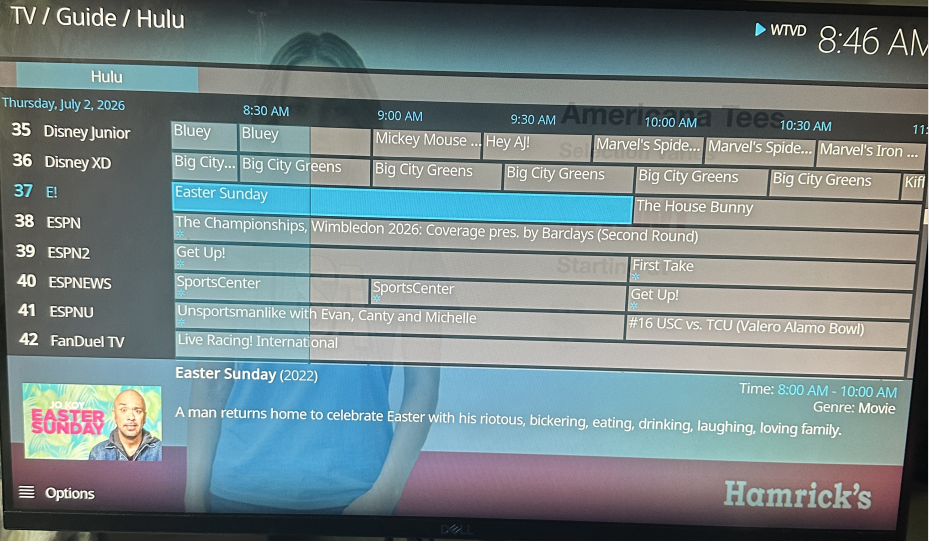
This was the part they missed most, so I rebuilt it from scratch: a real channel guide grid — channels down the side, times across the top, show names, descriptions, artwork. Around 400 free channels:
- Their favorites come first. WRAL News+ — Raleigh’s 24/7 local news — is literally channel 1, not channel 421. The stuff they watch is at the top, because I decided it should be.
- Press OK and you’re watching. Pick a show, press OK, it plays. Early on it used to pop up a little dialog asking them to click “Switch” (with a baffling “Find similar” button next to it). I watched Dad get stuck on that exact screen, and I ripped it out. Now OK just tunes the channel, like a TV should. (The description is still there — one press of Info — just out of the way of simply watching.)
- I removed the power-user clutter. There was a row of “Guide / Channels / Recordings / Timers” shortcuts they found fiddly and janky. Watching them poke at it once was enough. Gone. No menu committee to ask, no setting a vendor hid from me — just gone.
Their weather, their videos, their photos
- Weather is their weather — Goldsboro conditions and forecast, pulled straight from the National Weather Service. No account, no setup, no API key to expire, and it says “Goldsboro, NC” at the top the way it should.
- YouTube is signed in and simplified — one tile drops them straight onto the channels they follow; another opens the full app if they want to poke around. Nobody typed a password into the TV to make that happen.
- Their own library is right there. Movies, Shows, a Photo Album, and — as a first-class item on the main menu, not buried three folders deep — Home Videos. (including camcorder tape rips from the 80’s!)
It never sleeps, never blanks, never shows a login screen
The screen doesn’t go dark on its own. It doesn’t suspend and refuse to wake. It never blanks to a screensaver they have to dismiss. It never, ever shows a Linux login prompt. As far as the room is concerned, there is no computer here.
And when it breaks, I fix it in ninety seconds , from home
Things break. The difference is what happens next. With a commercial box, a bad update or a corrupted system means a factory reset, a support queue, or a new box in the mail — and me, helpless, a long drive away. With this one, I flip it into a recovery mode it carries inside itself and roll it back to a known-good copy of its own operating system. No USB stick, no monitor, no truck roll, no vendor’s timeline. I’m the keeper of this thing, and being the keeper means I’m never stuck.
The whole point: every decision above is one a company would have made for me — badly, or not at all. Here I made them, for the two people who’ll never see the machinery and should never have to. Now here’s the machinery.
Part 2 — What’s under the hood
Everything below is the engineering that lets me keep total control of a real computer while my parents only ever see a TV that works. The individual technologies are all off-the-shelf. The value is in the integration judgment: the ordering, the fallbacks, and the recovery net that makes “a computer I control” safe to put in a house two hours away.
Stack, for the curious: Linux Mint + a second Ubuntu recovery OS · GRUB / systemd / LightDM / X11 · partclone + zstd imaging · Kodi 21 “Omega” · a from-scratch Python IPTV stack (pvr.iptvsimple + inputstream.adaptive) · in-kernel rc-core for the IR remote · VPN · PowerShell for the content pipeline.
1. The recovery core: why a broken box is a five-minute fix, not a crisis
The reason I can put a general-purpose computer in my parents’ living room and sleep at night is a partitioning and recovery design I dreamed up way back in the 90’s. The single NVMe drive is carved into five partitions, and — this is the key move — two of them are complete operating systems:
 nvme0n1  (~953 GiB, GPT)
 ┌──────┬────────────┬────────────┬───────────┬─────────────────────────┐
 │ p1   │ p2         │ p3         │ p4        │ p5                      │
 │ ESP  │ OS (Mint)  │ recovery   │ images    │ data                    │
 │ vfat │ ext4 → /   │ ext4 (NOS) │ snapshots │ media / user data       │
 └──────┴────────────┴────────────┴───────────┴─────────────────────────┘
                 ▲             │          ▲
                 └── images ───┘  restores└── into ── p2
- p2 is the day-to-day OS (Linux Mint + Kodi) — the one my parents live in.
- p3 is a minimal Ubuntu recovery OS, whose only job is to image and restore p2.
- p4 stores the OS snapshots.
You can never safely image the OS you’re running — a mounted, read-write root gives you an inconsistent snapshot. So the recovery OS boots with p2 unmounted, images it clean, and reboots back. The whole loop runs headless, over SSH — I drive it from my keyboard, wherever the box happens to be. It images and restores from itself: no USB stick, no external tools, nothing to mail. What it deliberately does not do is restore on its own — I own that trigger, on purpose. The box carries the cure; I decide when to administer it.
In plain English: Factory resets are easy, and I can do them remotely. Also, I can apply upgrades, and even take in-place snapshots that hang out on the recovery partition, ready for restore later.
The one-shot recovery flip you can’t get stuck in
A headless box that flips itself into a recovery OS is terrifying, because if it ever rests in recovery, the living room sees a black screen forever. The fix is a single-use GRUB entry (grub-reboot semantics on a saved default). The resting default is always the main OS; recovery is reachable exactly once; any plain reboot returns to Mint:
# wire-grub.sh — a stable, one-shot "SSH Recovery" entry that chainloads the
# recovery OS's own grub.cfg BY UUID (survives recovery kernel updates).
menuentry "SSH Recovery (one-shot)" --id ssh-recovery {
    insmod part_gpt
    insmod ext2
    search --no-floppy --fs-uuid --set=root $REC_UUID
    configfile /boot/grub/grub.cfg
}

# A grub.d drop-in that WINS over Mint's own 50_linuxmint.cfg (sourced AFTER
# /etc/default/grub, so editing that file alone is silently overridden):
GRUB_DEFAULT=saved            # grub-reboot one-shot; box always RESTS on main
GRUB_TIMEOUT=0
GRUB_TIMEOUT_STYLE=hidden
GRUB_RECORDFAIL_TIMEOUT=0     # stays instant even right after a recovery trip
GRUB_DISABLE_OS_PROBER=true   # clean, stable menu — no churn from the extra OS
The integration detail that eats an afternoon if you don’t know it: Mint re-sources 50_linuxmint.cfg after /etc/default/grub, so the obvious edit is silently reverted. Shipping the config as a higher-sorting grub.d drop-in is what makes it stick. And GRUB_RECORDFAIL_TIMEOUT=0 is the other non-obvious one — without it, the very first boot after a recovery trip shows a 30-second menu on a TV with no keyboard attached.
A recovery OS that borrows the WiFi password and never keeps it
The recovery OS is WiFi-first and headless, but it can’t have the WiFi password baked in — that’s a per-house secret, and the recovery image is meant to be generic and reproducible across units. So at every recovery boot it mounts the main OS read-only, copies its WiFi profile, connects, and unmounts before any imaging happens:
# import-wifi-from-mainos.sh — runs at recovery boot.
# Mint stores its WiFi as netplan YAML in /etc/netplan/90-NM-*.yaml. Mount p2
# READ-ONLY — with norecovery, because a plain ro mount HANGS on an ext4 whose
# journal needs replay — copy the profile, unmount before imaging.
DEV=/dev/disk/by-uuid/$MAINOS_UUID
mount -o ro,norecovery "$DEV" "$MNT" 2>/dev/null || exit 0
for f in "$MNT"/etc/netplan/90-NM-*.yaml; do
  [ -e "$f" ] && cp -a "$f" /etc/netplan/
done
umount "$MNT" 2>/dev/null || umount -l "$MNT" 2>/dev/null || true
netplan generate
The result is a recovery OS that is never told the password and never stores it — it inherits whatever the current house uses, then forgets it. That ro,norecovery flag matters more than it looks: a plain read-only mount of an ext4 with a dirty journal will hang, and on a headless box a hang is indistinguishable from a crash. There’s also a wired rescue path — any plugged-in ethernet cable auto-configures in both operating systems, the guaranteed way back in if WiFi ever won’t associate.
In plain English: the emergency brain can get online at my parents’ house without me ever hardcoding their WiFi password into it — it peeks at the main system’s saved network on the way up, then lets go.
Imaging by fixed FS-UUID, not device path
Every tool — fstab, GRUB, the imaging scripts — references partitions by fixed filesystem UUID, never /dev/nvme0n1pX. That’s what turns a hand-built box into a factory image: one golden image drops onto any identical unit and boots with zero per-unit surgery; only the data partition rolls a fresh UUID. The imaging itself is partclone piped through zstd — only the used blocks, about 3.5:1 compression — behind hard safety rails:
# create-image.sh — runs ON THE RECOVERY OS. Resolves everything by UUID.
ROOT="$(blkid -U "$MAIN_FSUUID")"   || die "main root not found"
# HARD safety: refuse to image a MOUNTED root (would be inconsistent)
findmnt -S "$ROOT" >/dev/null 2>&1 && die "$ROOT is mounted — run from recovery only"
mountpoint -q "$IMAGES" || die "$IMAGES is not mounted"

partclone.ext4 -c -s "$ROOT" | zstd -T0 -3 > "$IMG"   # only used blocks
# ...plus a dd of the ESP, an sgdisk GPT backup, and a manifest recording the
# root/ESP UUIDs so a restore can verify it's writing the right image.
Restore was proven destructively: plant a marker file, restore the snapshot, confirm the marker is gone and e2fsck comes back clean. A backup you haven’t restored from is a rumor, not a backup.
A war story that became a code change. Building the recovery OS inside a
chroot, I recursively bind-mounted/sysand later lazy-unmounted it. Because Linux mounts areMS_SHAREDby default, that unmount propagated back to the live host and tore thecgroup2filesystem off the running main OS. systemd could suddenly no longer create cgroups, and Kodi died with219/CGROUP. The whole desktop quietly came apart because of an unmount in what I thought was a sealed sandbox. The fix was one flag —mount --make-rslaveon every chroot bind, so a lazy unmount can never reach the host again — and it’s now baked into the build script. This is the kind of thing you only learn by breaking your own machine at an inconvenient hour.
2. Free live TV, built from scratch
My parents missed cable. So the box streams ~420 free live channels in a real cable-style guide grid — with zero third-party add-ons or sketchy hosts. It’s a few hundred lines of my own Python talking only to Pluto’s official API (a free account, their published endpoints), feeding Kodi’s native PVR via standard M3U + XMLTV files. Two small services:
- A generator (a systemd timer, every ~4 hours plus once at boot) pulls the lineup and program guide and writes
playlist.m3u8+epg.xml— with a health check that keeps the last-known-good files on a bad fetch, and atomic writes, so it can never ship half a guide. - An always-on resolver (
127.0.0.1:7777,Restart=always) mints a fresh, entitled streaming session on every single channel tune, so the playlist never goes stale.
The bug was the player engine, not the manifest
This was the hardest debugging of the whole project. Playback worked fine — until every ad break froze the box. At each commercial, the audio timestamps jumped tens of seconds, the audio renderer stalled (large audio sync error → stream stalled), and Kodi hung.
I burned real hours treating symptoms: pinning a single quality variant, synthesizing my own master playlists, even writing a proxy to strip PROGRAM-DATE-TIME tags. None of it worked — because the real problem was one layer down from where I was looking. The default player engine’s audio pipeline simply cannot ride Pluto’s server-side ad-splice discontinuity. The fix was to switch engines to inputstream.adaptive, a proper HLS engine that handles those splices, and feed it a clean, single-variant, subtitle-stripped master (the one thing that had ever made ISA choke on Pluto was a subtitle child-manifest — drop the subtitle group and that failure mode vanishes):
# pluto.py — resolve_master(): build a CLEAN single-variant HLS master for ISA.
# Keep ONE top-bitrate video variant + the default audio rendition; drop the
# subtitle group + DVS track. Every child URI carries the jwt, so ISA streams
# media playlists + segments STRAIGHT from Pluto's CDN — no proxy, no transcode.
inf = re.sub(r',?SUBTITLES="[^"]*"', "", best_inf)      # drop subtitle ref
abs_video = urllib.parse.urljoin(base, best_uri)
default_audio = next((l for l in audio if "DEFAULT=YES" in l), audio[0] if audio else None)
out = ["#EXTM3U"] + header + ([default_audio] if default_audio else []) + [inf, abs_video]
The lesson worth keeping: when a whole class of fixes all fail, stop refining the fix and question which layer you assumed was broken. I finally confirmed it by reading how a mature project (SlyGuy) actually plays Pluto — it uses ISA and keeps the timestamps I’d been stripping — which told me my manifest tricks were a dead end and the engine was the answer.
Everything degrades instead of going dark
My parents can’t recover from a hard failure, so the resolver is written to never hand them one. Every risky path has a softer fallback underneath it:
# resolver.py — if the clean-master parse ever fails, fall back to Pluto's raw
# master via 302 so a tune NEVER goes fully dark.
try:
    self._m3u8(pluto.resolve_master(channel_id))
except Exception:
    self._redirect(pluto.stream_url(channel_id))   # last resort, still plays

# pluto.py — if a session refresh fails but we still hold a token, keep serving
# the old one rather than going offline.
if stale:
    try: self._mint()
    except Exception:
        if not self._token: raise      # only fail if we have NOTHING
The rule across the whole system: fall back, keep last-known-good, degrade gracefully — never present a blank screen. A slightly-worse stream beats a dead channel every time when there’s no one there to retry.
Mixing in non-Pluto channels with a one-dict-per-channel list
They wanted their local news (WRAL) that Pluto doesn’t carry. Rather than special-case it, the generator merges a small static channel list — first-party public HLS feeds — into the same guide grid. Adding a channel is appending one dictionary; no resolver, no token upkeep, because WRAL’s own CDN mints its segment tokens. A curated Favorites group is emitted first, which is exactly why WRAL lands as channel 1 instead of channel 421.
Designing out the “blank guide after reboot” bug
Kodi caches the program guide in a front-end database and only re-pulls it on a ~120-minute timer whose timestamp survives restarts — the classic reason a guide goes blank after a reboot. I fixed it in three layers, all verified after real cold boots:
- Gate the boot on a fresh guide — the Kodi session is ordered
After=/Wants=the generator (deliberately notRequires=, so a Pluto outage can’t brick the TV), so Kodi never launches against a stale guide. - Clear the throttle — the session wrapper deletes the EPG cache before every launch, forcing a rebuild from the current data (channels and timers live in a different database, left untouched).
- Steady state — an hourly re-import plus a regeneration cadence that never lets the guide horizon expire.
I also found and killed a second, boot-time regeneration that was atomically swapping the playlist out from under the PVR importer mid-import, aborting it and leaving live TV dead until a restart.
3. The appliance illusion: making “My customized Kodi install is the OS”
Everything in Part 1 rests on a pile of small, deliberate choices whose only job is to make sure my parents never see the computer I put under their TV:
- Boots straight into Kodi — LightDM autologins into a standalone X11 Kodi session behind a quiet spinner splash (not the Mint logo, so even the boot never reveals the OS). No desktop.
- Kodi relaunches forever — a session wrapper re-runs it on exit, so there’s no way to fall out to a shell.
- Every sleep path masked — suspend, hibernate, idle, lid, DPMS, screen-blanking: all dead. (Suspend is poison on mini-PCs — half of them never wake cleanly.)
- Updates and telemetry frozen — no apt timers, no fwupd, no add-on auto-updates. The box changes when I change it, never on its own; patches ship only as rebuilt golden images.
Editing a read-only skin by shadowing it
Kodi’s skin is read-only inside its Flatpak sandbox. To pare the home menu down to eight big items and enforce the senior-friendly behaviors, I shadow the skin into userdata with its version bumped to 99.0.0 so my copy wins over the built-in one — then every edit is reproducible via one idempotent script that rebuilds from clean stock each run. No hand-hacking a file I can’t regenerate.
“One button, one behavior,” implemented
That confidence-changing UX rule from Part 1 comes down to a single line per menu item. In stock Kodi, Select launches an item while Right focuses its widget — two results from two keys my parents treat as one. I made every home item do the same thing on both:
<!-- each home item's onclick focuses its own widget group, so Select == Right -->
<onclick>SetFocus($INFO[Container(9000).ListItem.Property(menu_id)])</onclick>
The constraint that makes it work: each item’s menu_id has to equal its widget’s control-group id. Get that wrong and focus lands nowhere — which is its own kind of dead end.
Never use Kodi’s graceful shutdown on an appliance
Kodi’s polite Quit()/Reset()/Powerdown() path often hangs this appliance on a black screen when it waits on a teardown that never completes. I learned this the hard way when the menu’s Reboot wedged the box: the OS stayed up but never actually rebooted, recoverable only by the physical button. One of my parents could have hit that and been stranded. So all three power actions route through one tiny in-process helper that SIGKILLs Kodi directly; the session wrapper reaps it and either relaunches or, reading a one-word sentinel file, calls a tightly-scoped systemctl reboot/poweroff:
Restart Kodi → SIGKILL → wrapper relaunches
Reboot       → drop ".tvpc-poweraction=reboot" sentinel → SIGKILL → wrapper: systemctl reboot
Power off    → drop ".tvpc-poweraction=poweroff" sentinel → SIGKILL → wrapper: systemctl poweroff
That same helper is what gives them their one-button unstick: the remote’s red button restarts Kodi, routed through a neutral keycode (never KEY_POWER, so no amount of mashing can switch the machine off).
A real IR remote via in-kernel rc-core (no LIRC)
The big-button remote drives Kodi over infrared the modern way: pure in-kernel rc-core decoding, no LIRC, no daemon. Each IR scancode maps to a standard Linux KEY_* that Kodi already understands, so a button press flows kernel → X11 → Kodi with almost no glue in between. Two buttons wear sticker labels (Info, Pause); Back stops any playing video; Home returns to the main menu and stops playback in a single press.
The gotcha: X reads a device’s key list exactly once, the moment the device appears. Load a new keymap after X has already enumerated the receiver and it silently ignores the new keys. (Classic symptom: arrows work, but Volume, Mute, and Pause do nothing.) The fix is to make sure the keymap loads before X enumerates the device at boot, so a clean boot with the receiver already plugged in Just Works — which, on an appliance that only ever cold-boots, is the only case that matters.
4. The rest of the stack (briefly — the patterns repeat)
- YouTube, senior-shaped. Signed in via device code (no password ever typed on the TV) using personal API keys (no shared-quota errors), playing through ISA (no DRM needed for normal videos). Two home tiles — subscriptions vs. the full app — drive the same add-on at two different paths, so there’s no second add-on to collide with.
- No-key weather from the US National Weather Service, with their location’s grid and station pre-resolved into the config — no dead third-party endpoint, no API key, and the “Goldsboro, NC” heading actually populated.
- Reachable from anywhere over a private VPN. Both the main and recovery OS join a VPN network sharing one identity, so the box answers at the same fixed address wherever it’s plugged in — no port-forwarding at their router. This is the backbone of the whole “I control it from my house” promise: SSH and the content-push tool work identically whether the box is on my bench or in their living room, in either operating system.
- Remote screenshots with zero extra packages —
xwdplus a standard-library-only PNG converter, so I can see their screen to debug without installing anything on a frozen field unit.
The best bug of the project. Intermittently — about 1 cold boot in 6 — the weather tile would hang on “Busy” forever. It looked exactly like a network problem. It wasn’t. On a cold boot, Kodi fires roughly eight add-on scripts at once as concurrent Python subinterpreters, and the first import of a date-parsing library deadlocks inside CPython’s own import machinery. The weather thread wedged in
importlibfor the entire life of the session — idle CPU, same stack frame for twelve minutes. I caught it live withpy-spy, reading the frozen Python stack right off the running process. The fix: that add-on only ever parsed standard ISO-8601 timestamps, so I swapped the heavy library for a tiny standard-library shim — now the offending module is never imported at all, and the deadlock’s precondition is simply gone. A warm restart never showed the bug (no simultaneous herd of scripts), which is precisely why “just restart it” had always looked like a fix and never was.
What I’d want you to take away
The individual technologies here are all off-the-shelf — Linux, Kodi, partclone, a VPN. What isn’t for sale is the UX design and integration, and the control that comes with owning it end to end:
- I decide what my parents’ TV is — every feature, channel, and button — instead of accepting what Amazon or Samsung decided to ship and monetize.
- Every failure degrades — fall back, keep last-known-good — instead of going dark, because there’s no one in the room to retry.
- Everything is ordered correctly against the parts of a system that only read state once: X’s key list, Kodi’s guide throttle, GRUB’s saved default, Mint’s config sourcing order.
- The box never mutates or shuts itself down “gracefully,” and it never updates itself out from under me. It changes when I change it.
- And under all of it, a recovery net that means me typing a command from my house and it’s back in ninety seconds — not a support queue, not a new box, not a vendor’s timeline.
That last one is the quiet center of the whole thing. I didn’t rent my parents a TV from a company that would own their living room. I built them one — a genuinely great one, tuned to exactly what they love — and I kept the keys. They get a TV that just works. I get a linux box I fully control. Nobody gets a landlord.
Appendix: stack at a glance
OS / appliance: Linux Mint 22.3, Ubuntu (recovery OS), GRUB, systemd, LightDM, X11, netplan/NetworkManager, Flatpak
Imaging / recovery: partclone, zstd, sgdisk, e2fsprogs, fixed-FS-UUID identity model
Media: Kodi 21 “Omega”, pvr.iptvsimple, inputstream.adaptive, XMLTV / M3U
Code: Python (Pluto client, resolver, generator), Bash (build / recovery / appliance scripts), PowerShell (content pipeline), Kodi keymap / skin XML
Input / remote: in-kernel rc-core / ir-keytable (no LIRC)
Networking: Shared-identity VPN, Avahi / mDNS, dual 2.5 GbE + WiFi
Debugging highlights: py-spy live stack capture, journald forensics, HLS manifest analysis